
Table of Contents
bgp ip transit info
Getting your IPs from RIPE/ARIN etc. takes a lot of time and back and forth. Prepare at least for a month if you need to wait for someone else to transfer the IPs to you.
The obtained subnet can be advertised from your server(s) via goBGP or similar. There are 2 ways to do it dynamic or static BGP routing. You need to tell your server provider which one you want.
Sometimes the provider might ask you for a Letter of authorization (LOA). This is a legal document which you need to fill out to prove you are the actual owner of the advertised IPs. You should ask the provider to send you a template if you don't have one. Example here.
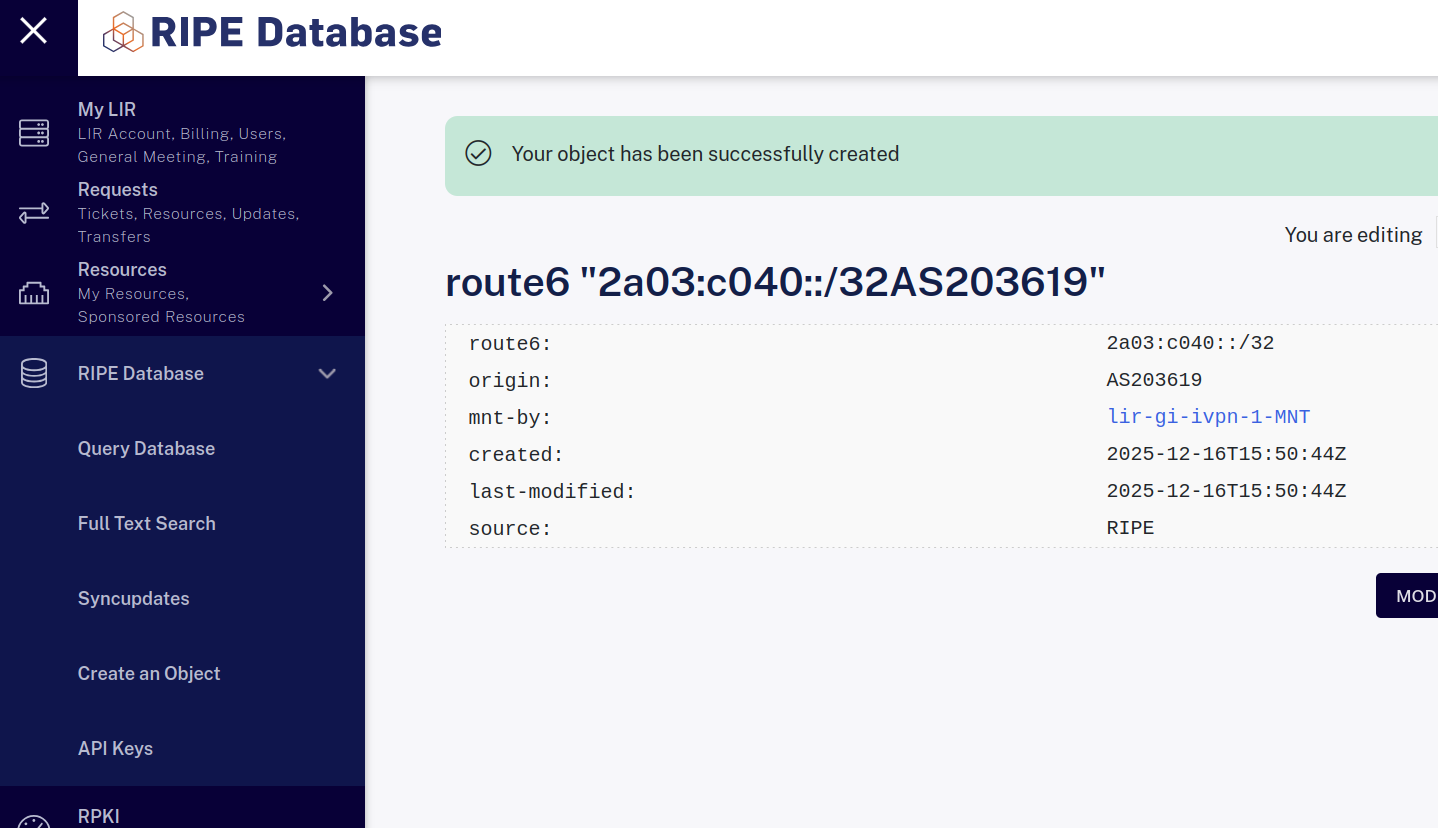
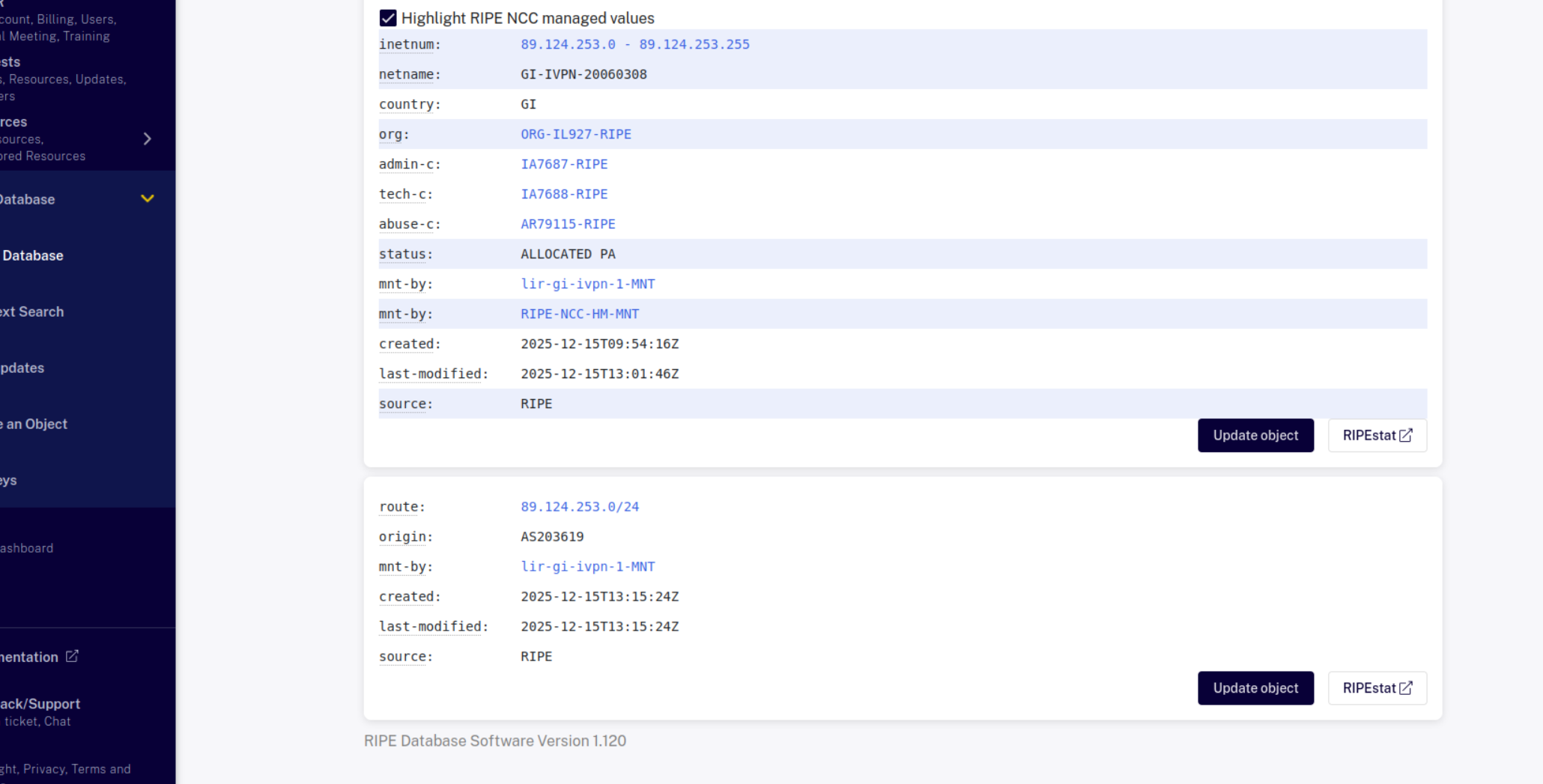
In dynamic setup you use your own AS# then you would setup BGP, and create a route object with ripe/arin for your ipv4 and ipv6 and specify the origin as your AS#. That would be dynamic routing as you could advertise or remove it from the provider on your own.
If you want it routed under our ASN of the server provider (more statically as they would have to add/remove it manually), they would create the route object for your ipv4 and ipv6 or you can, and specify Origin as ASN# of the provider, and they would simply route the ips to your server directly.
Here's an example after creating route objects in RIPE
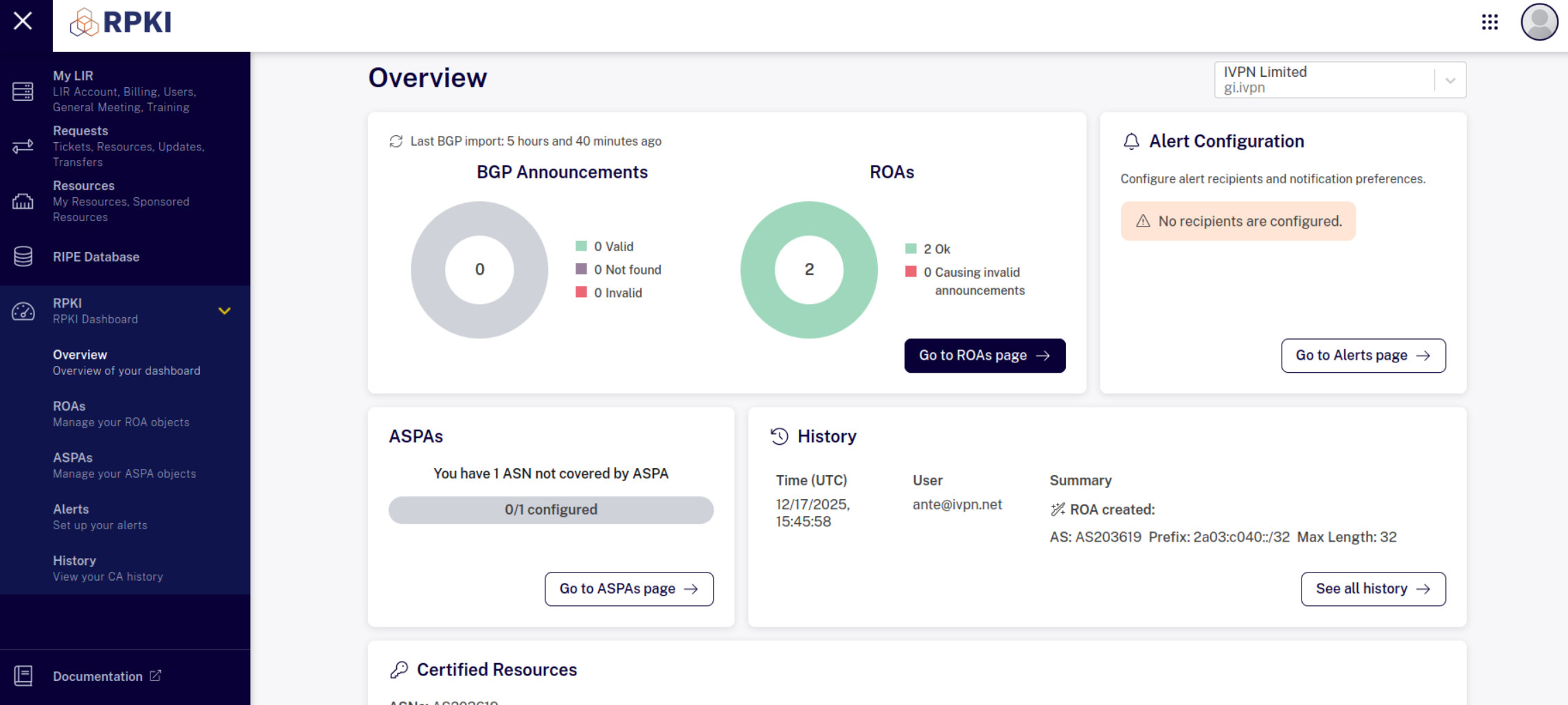
You also need to add the ROA objects:
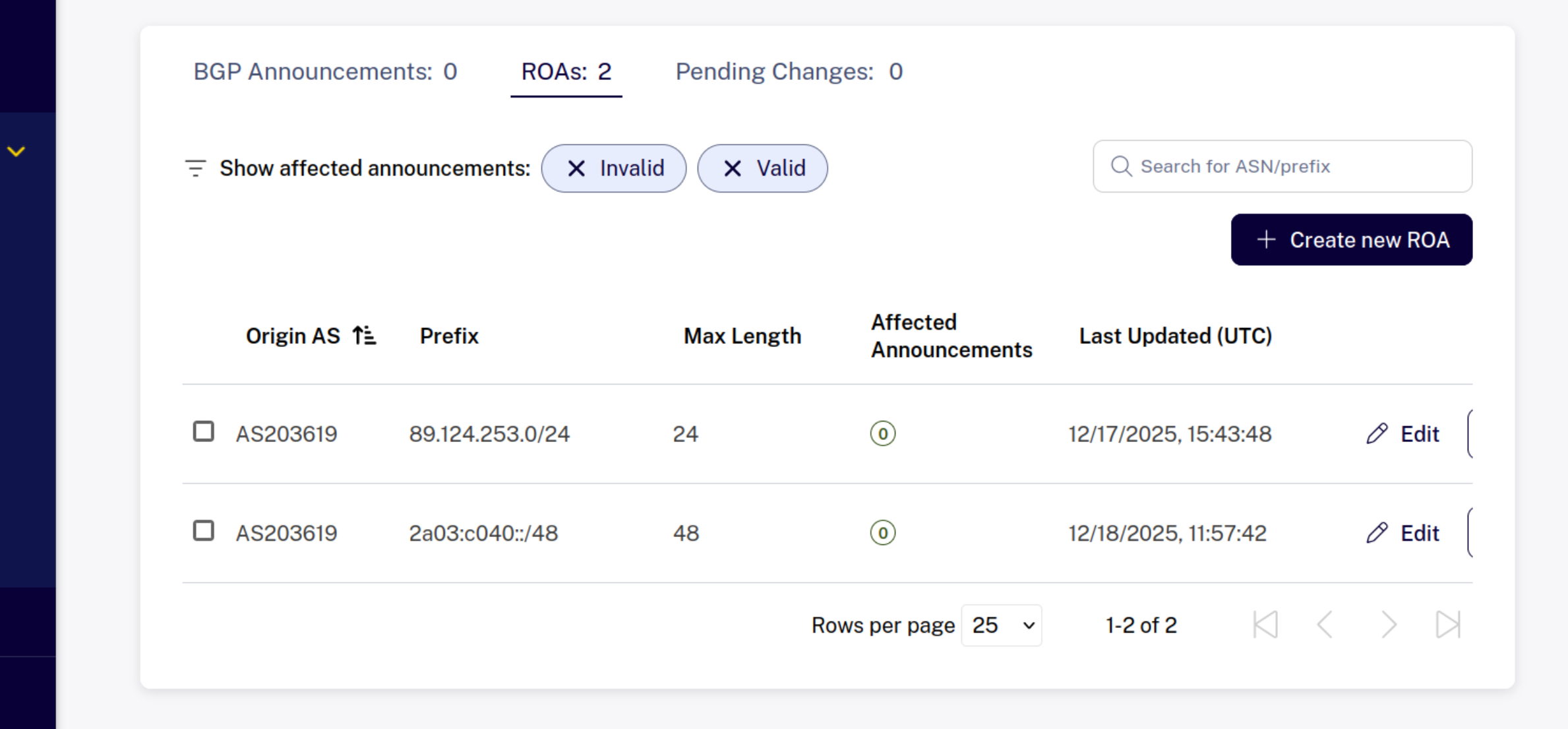
Then you can query it in the database “Query Database”, by entering the IPv6 or v4 subnet.
The minimum routing for ipv6 is a /48 for BGP. typically a /64 is assigned to your own customers. for ipv4 it is a /24 for minimum for BGP routing.
So make sure you have your route objects created for the /24 ipv4 and at least a /48 or larger for the ipv6 block that you want to advertise with your ASN as the registered origin.
Provider will add your ASN to their AS-Set so you can advertise the prefixes under your ASN through the provider. It sometimes will take up to 48hrs for upstreams to see your prefixes and allow it, so the sooner you get those route objects created the better. Example: https://www.radb.net/query?keywords=as-tzulo
If you only have one location, then you can advertise the whole /32 block. if you have more then 1x location then you can split it to /48s or /40 or /36 etc. so you have large block in each location. if you do split it smaller then a /32, then you should create that route object as well to match.
gobgp software example
A working BGP session with gobgp software.
You need to allow inbound port 179 in the firewall for both v4 and v6.
For IPv6 you need to have that set up on the network interface as well:
2: eth0: <BROADCAST,MULTICAST,UP,LOWER_UP> mtu 1500 qdisc mq state UP group default qlen 1000
    link/ether a0:36:9f:d6:67:c0 brd ff:ff:ff:ff:ff:ff
    inet 198.44.157.3/29 brd 198.44.157.7 scope global noprefixroute eth0
       valid_lft forever preferred_lft forever
    inet6 2607:9000:600:24::2/64 scope global noprefixroute
       valid_lft forever preferred_lft forever
    inet6 fe80::a236:9fff:fed6:67c0/64 scope link noprefixroute
       valid_lft forever preferred_lft forever
gobgpd.conf:
[global.config]
  as = 203619
  router-id = "198.44.157.3"

[[neighbors]]
  [neighbors.config]
    neighbor-address = "198.44.157.1"
    peer-as = 11878

[[neighbors]]
  [neighbors.config]
    neighbor-address = "2607:9000:600:24::1"
    peer-as = 11878
router-id should be the IP address of your interface (eth0)
as is your assigned ASN number.
neighbor-address is the IP of the peer, provider should give you this info. There can be multiple peers for redundancy, so you just need to repeat this section for all the other IPs.
peer-as is peer ASN, also given by provider.
Provider might also give you a multihop-ttl value. If this is the case you need to add the following to both ipv4 and ipv6 configuration to above (change the value):
[neighbors.ebgp-multihop.config]
    enabled = true
    multihop-ttl = 64
After starting gobgp you should see the session is established:
# gobgp neighbor
Peer                   AS     Up/Down State       |#Received  Accepted
198.44.157.1        11878 1d 19:27:31 Establ      |        9         9
2607:9000:600:24::1 11878    00:13:06 Establ      |        1         1
Received and Accepted columns can also be 0. Depends on provider routing.
Check the routing table. You might see something like this
# gobgp global rib -a ipv4
   Network              Next Hop             AS_PATH              Age        Attrs
*  0.0.0.0/0            198.44.157.1         11878 36236          00:06:22   [{Origin: i}]
*  23.234.84.0/24       198.44.157.1         11878                00:06:22   [{Origin: i}]
*  23.234.85.0/24       198.44.157.1         11878                00:06:22   [{Origin: i}]
*  23.234.86.0/24       198.44.157.1         11878                00:06:22   [{Origin: i}]
*  23.234.87.0/24       198.44.157.1         11878                00:06:22   [{Origin: i}]
*  89.124.253.0/24      0.0.0.0                                   00:06:23   [{Origin: ?}]
*  198.44.132.0/24      198.44.157.1         11878                00:06:22   [{Origin: i}]
*  198.44.140.0/24      198.44.157.1         11878                00:06:22   [{Origin: i}]
*  198.44.157.0/24      198.44.157.1         11878                00:06:22   [{Origin: i}]
*  198.54.132.0/24      198.44.157.1         11878                00:06:22   [{Origin: i}]
# gobgp global rib -a ipv6
   Network              Next Hop             AS_PATH              Age        Attrs
*  ::/0                 2607:9000:600:24::1  11878 36236          00:06:27   [{Origin: i}]
*  2a03:c040::/48       ::                                        00:06:24   [{Origin: ?}]
or this
- download
# gobgp global rib -a ipv4
   Network              Next Hop             AS_PATH              Age        Attrs
*  89.124.253.0/24      0.0.0.0                                   00:44:53   [{Origin: ?}]
# gobgp global rib -a ipv6
   Network              Next Hop             AS_PATH              Age        Attrs
*  2a03:c040::/48       ::                                        00:44:54   [{Origin: ?}]
This should be ok. What you need to check is that you are advertising your IPs you should see something like:
- download
# gobgp neighbor 198.44.157.1 adj-out
   ID  Network              Next Hop             AS_PATH              AttrsFiltered
   1   89.124.253.0/24      198.44.157.3         203619               [{Origin: ?}]not filtered
Now you can assing IPs from the subnet you own to the loopback interface. It should work even though its not on the eth0 interface.
1: lo: <LOOPBACK,UP,LOWER_UP> mtu 65536 qdisc noqueue state UNKNOWN group default qlen 1000
    link/loopback 00:00:00:00:00:00 brd 00:00:00:00:00:00
    inet 127.0.0.1/8 scope host lo
       valid_lft forever preferred_lft forever
    inet 89.124.253.5/32 scope global lo
       valid_lft forever preferred_lft forever
    inet6 2a03:c040::5/128 scope global
       valid_lft forever preferred_lft forever
    inet6 ::1/128 scope host
       valid_lft forever preferred_lft forever
Sometimes you might get an IP address from the private space from the provider like 10.255.0.2 for your side of the BGP session. You need to add it (via ip, nmcli etc.) to your main interface for it to work e.g.
1: lo: <LOOPBACK,UP,LOWER_UP> mtu 65536 qdisc noqueue state UNKNOWN group default qlen 1000
    link/loopback 00:00:00:00:00:00 brd 00:00:00:00:00:00
    inet 127.0.0.1/8 scope host lo
       valid_lft forever preferred_lft forever
    inet 89.124.253.5/32 scope global lo
       valid_lft forever preferred_lft forever
    inet6 2a03:c040::5/128 scope global
       valid_lft forever preferred_lft forever
    inet6 ::1/128 scope host
       valid_lft forever preferred_lft forever
2: eth0: <BROADCAST,MULTICAST,UP,LOWER_UP> mtu 1500 qdisc mq state UP group default qlen 1000
    link/ether 5c:b9:01:90:1c:e8 brd ff:ff:ff:ff:ff:ff
    inet 45.128.135.226/32 scope global noprefixroute eth0
       valid_lft forever preferred_lft forever
    inet 10.255.0.2/30 scope global eth0
       valid_lft forever preferred_lft forever
...

# gobgp neighbor
Peer            AS  Up/Down State       |#Received  Accepted
10.255.0.1  206804 00:00:55 Establ      |        1         1
fd00:136::1 206804    never Active      |        0         0
Checking propagation
RIPE has BG play tool to check the history of route propagation here https://stat.ripe.net/bgplay/ and https://stat.ripe.net/lg.
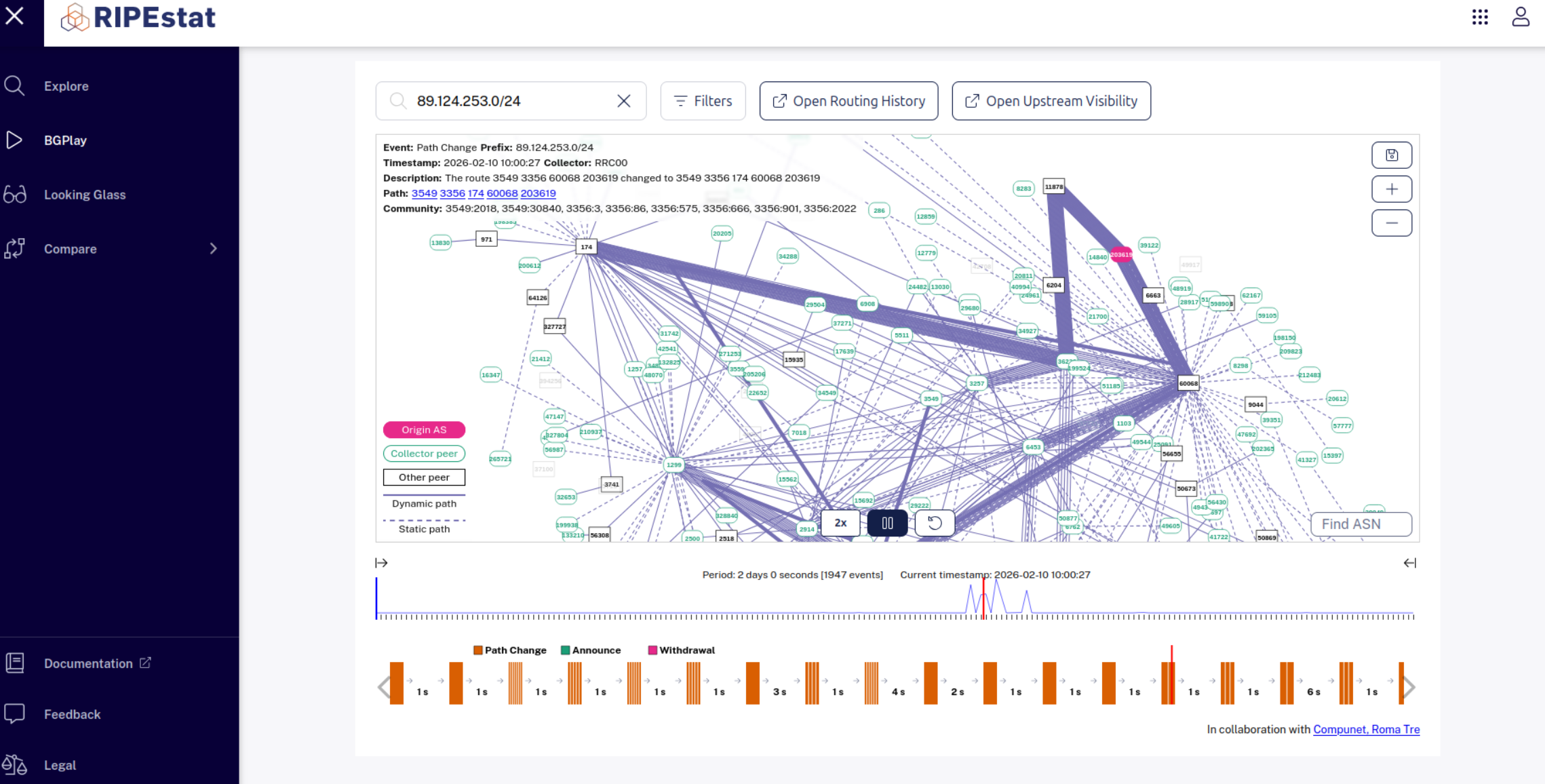
Here's an example of Tzulo server provider which advertises to multiple upstreams https://bgp.he.net/AS11878#_graph4
https://bgp.tools/as/11878#connectivity
which has multiple arrows pointing to upstreams.
Updating AS path length
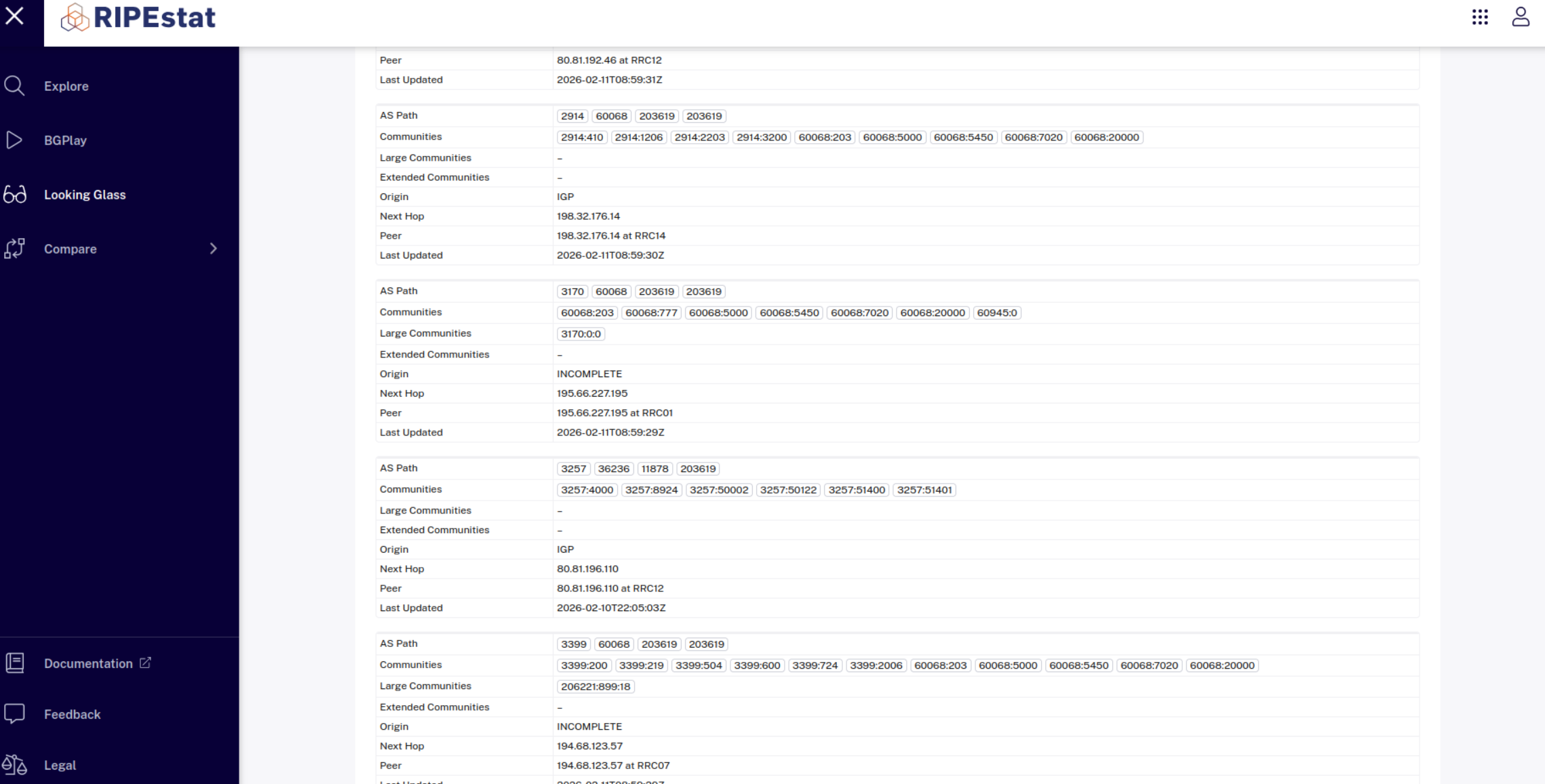
When advertising IP from multiple providers, one can have a shorter AS path and take all the traffic for itself. You can adjust the length of the AS path on your side by prepending your AS number 1 or more times to extend the path.
Example using gobgp:
[global.config]
...
[global.apply-policy.config]
export-policy-list = ["prepend_as_path"]
default-import-policy = "accept-route"
default-export-policy = "accept-route"

[[neighbors]]
...
...

[[policy-definitions]]
name = "prepend_as_path"
  [[policy-definitions.statements]]
  name = "stmt_prepend"

    [policy-definitions.statements.actions]
      route-disposition = "accept-route"

    # number of times to prepend our asn. This allows for controlling
    # the length of th AS path that packet takes so it affects routing
    # https://www.noction.com/blog/as-path-and-as-path-prepending
    [policy-definitions.statements.actions.bgp-actions.set-as-path-prepend]
      as = "203619"
      repeat-n = 1
Here we're prepending the path 1 additional time. After restarting the service notice a repeating ASN in AS_PATH column
 # gobgp neighbor 213.155.129.101 adj-out
 ID  Network              Next Hop             AS_PATH              AttrsFiltered
 1   89.124.253.0/24      185.229.190.69       203619 203619        [{Origin: ?}]not filtered
On RIPE Looking glass this will be shown as
Withdrawing BGP announcements
In case you need to take the server offline for maintenance and you have a dynamic setup i.e. you yourself is advertising the routes via the BGP daemon on your server, it is sufficient to simply stop the BGP session on your side before the maintenance begins. Once the session is down, the advertisements for will be withdrawn automatically.
After the maintenance is completed, you can start the session again and the prefixes will be re-advertised as before.
Tested on
- gobgp_version: 4.2.0
- January 2026.